A machine-learning program can execute successfully on a table whose rows have been mismatched, units confused, or missing values disguised as zeros. Plotting that table will not repair it. Before fitting a model, we need to know what one row represents, which fields identify it, how values were measured, and whether transformations preserved those relationships.
This chapter introduces pandas for named tables and Matplotlib for descriptive plots. The examples are deliberately tiny and synthetic. Their values illustrate data operations; they are not measurements from a study, estimates of normal walking, or evidence about a clinical population.
4.1.1 Learning objectives and prerequisites
After this chapter, you should be able to:
Inspect a table’s shape, column names, types, identifiers, and missingness.
Select rows and columns while preserving observation identity.
Calculate a derived feature with explicit validity checks.
Join tables using keys and check the intended relationship between rows.
Keep features and targets aligned when converting to NumPy arrays.
Choose and label descriptive plots that support a stated question.
Read Chapter 2 and Chapter 3 first. This chapter develops data-handling skills; statistical interpretation is developed in the probability and estimation chapters. All blocks below are independently runnable. No block downloads data or modifies a disk dataset.
4.2 Step 1: Define the observation unit and schema
The observation unit is the entity represented by a row: a participant, a trial, a time window, or something else. The schema describes column meanings, types, units, and validity rules. It is a small agreement about what the data represent.
Our first table has one row per trial. A participant can contribute several trials, so participant_id is not a unique row key. trial_id is unique in this example. Identifiers are text even if they contain digits: an ID is not a quantity to average or an ordinal scale unless its design explicitly gives it that meaning.
Column
Meaning
Unit or rule
trial_id
Unique trial identifier
Nonmissing and unique
participant_id
Synthetic person identifier
May repeat across trials
distance_meters
Distance covered in a trial
Meters; nonnegative
duration_seconds
Elapsed trial duration
Seconds; positive when observed
Pandas represents a table using a DataFrame and a named one-dimensional column using a Series. These structures retain labels alongside values. See the pandas introduction.
# Step 1: Import tools for reading a CSV table from memory.from io import StringIOimport pandas as pd# Step 2: Describe synthetic trial records using an explicit header.# A blank duration field deliberately represents one missing measurement.csv_text ="""trial_id,participant_id,distance_meters,duration_secondsT01,P01,12.0,10.0T02,P01,12.0,12.0T03,P02,12.0,8.0T04,P02,12.0,T05,P03,12.0,15.0T06,P03,12.0,10.0"""# Step 3: Read the CSV while declaring identifier columns as text.with StringIO(csv_text) as input_stream:# read_csv parses rows and column names into a DataFrame. trials = pd.read_csv( input_stream, dtype={"trial_id": "string", "participant_id": "string"}, )# Step 4: Inspect structure before calculating a derived feature.print(trials.head())print("Table shape:", trials.shape)print("Column types:\n", trials.dtypes)print("Distinct participants:", trials["participant_id"].nunique())assert trials["trial_id"].notna().all()assert trials["trial_id"].is_unique
The table contains six trial rows from three participants. head() displays an initial sample; it does not validate the complete dataset. shape gives the row and column counts. dtypes helps identify columns that were parsed differently from their intended meaning. Use info() when you also want a compact overview of nonmissing counts.
An actual file path can replace input_stream. State expected encodings, delimiters, decimal conventions, identifier types, and missing-value markers when reading unfamiliar data. The read_csv reference documents these options. Do not assume every CSV producer uses the same conventions or that automatic type inference knows your measurement protocol.
4.3 Step 2: Select deliberately with labels and positions
table["duration_seconds"] selects one Series. A list of column names, such as table[["trial_id", "duration_seconds"]], selects a DataFrame. .loc[rows, columns] selects by labels or a Boolean row mask, while .iloc[rows, columns] selects by integer position. DataFrame index labels are not guaranteed to equal row positions. After filtering, sorting, or loading data, that difference is especially important. See pandas indexing and selection.
# Step 1: Create a small table with deliberately nonsequential index labels.import pandas as pd# Each row is a synthetic trial; the index labels are not positions 0, 1, 2.trials = pd.DataFrame( {"trial_id": ["T01", "T02", "T03"],"participant_id": ["P01", "P01", "P02"],"duration_seconds": [10.0, 12.0, 8.0], }, index=[100, 200, 300],)# Step 2: Select records for one participant using a Boolean mask.# The mask preserves the table's index labels for row-wise selection.participant_mask = trials["participant_id"] =="P01"# Explicitly copy the selection before any independent modification.participant_trials = trials.loc[ participant_mask, ["trial_id", "duration_seconds"]].copy()# Step 3: Compare one label-based selection with a position-based selection.print("Row with label 200:\n", trials.loc[200])print("Row at position 1:\n", trials.iloc[1])print("Trials for P01:\n", participant_trials)
Row with label 200:
 trial_id             T02
participant_id       P01
duration_seconds    12.0
Name: 200, dtype: object
Row at position 1:
 trial_id             T02
participant_id       P01
duration_seconds    12.0
Name: 200, dtype: object
Trials for P01:
     trial_id  duration_seconds
100      T01              10.0
200      T02              12.0
Both single-row selections happen to identify T02, but they express different rules. .loc[1] would look for index label 1, which this table does not contain. Choose selectors according to meaning, not according to which one happens to work on the first file.
When assigning selected values, use a single explicit .loc[...] = ... operation rather than chained selections. Such clarity makes the intended destination visible and avoids reliance on ambiguous mutation behavior across pandas versions.
4.4 Step 3: Investigate missing and invalid values separately
Missing means an expected value is unavailable. Invalid means a present value violates its contract. A blank duration is missing; a negative duration is invalid; zero is a real numeric value but is invalid for the divisor in our speed calculation. These cases should not be collapsed into a silent numerical replacement.
Pandas offers isna() and notna() to identify missing entries. Different data types may use different missing-value representations; direct equality with np.nan is not a reliable missingness test. Many summaries skip missing values, so always inspect the number of values contributing to a result. See pandas missing-data handling.
Count missing values by column.
Identify finite, physically valid measurements.
Retain valid rows for this calculation and print the excluded identifiers.
Compute speed only on those valid rows.
# Step 1: Create synthetic trials containing distinct quality problems.import numpy as npimport pandas as pd# The fourth duration is missing; the fifth is zero and therefore invalid.trials = pd.DataFrame( {"trial_id": ["T01", "T02", "T03", "T04", "T05"],"distance_meters": [12.0, 12.0, 12.0, 12.0, 12.0],"duration_seconds": [10.0, 12.0, 8.0, np.nan, 0.0], })# Step 2: Inspect missingness before discarding any rows.# Each count refers to one column, not to a participant population.missing_counts = trials.isna().sum()print("Missing values by column:\n", missing_counts)# Step 3: Define the complete validity rule for a speed calculation.# Both measurements must be finite, distance nonnegative, and duration positive.valid_trial_mask = ( np.isfinite(trials["distance_meters"])& np.isfinite(trials["duration_seconds"])& (trials["distance_meters"] >=0)& (trials["duration_seconds"] >0))# Preserve valid observations in a separate table for this worked calculation.valid_trials = trials.loc[valid_trial_mask].copy()# Keep excluded trial IDs visible so exclusion is not silent.excluded_trial_ids = trials.loc[~valid_trial_mask, "trial_id"]# Step 4: Calculate a derived feature only for valid observations.valid_trials["speed_meters_per_second"] = ( valid_trials["distance_meters"] / valid_trials["duration_seconds"])print("Excluded trial IDs:", excluded_trial_ids.tolist())print("Valid trials with calculated speed:\n", valid_trials)assertlen(valid_trials) ==3
This example excludes T04 and T05 for two different reasons. An exclusion policy for a real project should store a specific reason per row and report its effect on represented participants and conditions. A table of valid calculations is not automatically a representative sample.
Missingness may depend on the process being studied. For instance, a sensor might fail more often during a particular movement. Removing those rows changes which movements remain. Imputing a mean or median also changes the dataset and introduces assumptions. In predictive experiments, estimate such replacement values only from training data, within each training fold when cross-validation is used. Chapter 13 develops that workflow. This chapter deliberately does not learn a replacement value from the complete table.
4.5 Step 4: Join tables using identities rather than row order
A join combines records by shared keys. Suppose trial rows need participant-level metadata. A participant can appear in several trials, while the metadata table should contain one record per participant. This is a many-to-one relationship from trials to participants.
Do not paste a metadata column beside trials merely because both tables look sorted. Missing records, duplicate keys, and different sorting orders can attach one person’s values to another person’s trial. Use explicit keys and validate the expected relationship. Pandas documents the join options and cardinality checks in its merge guide.
# Step 1: Define synthetic trial rows and participant-level metadata.import pandas as pd# Three trials contain repeated participant identifiers.trials = pd.DataFrame( {"trial_id": ["T01", "T02", "T03"],"participant_id": ["P01", "P01", "P02"],"duration_seconds": [10.0, 12.0, 8.0], })# Participant metadata is deliberately stored in a different row order.participants = pd.DataFrame( {"participant_id": ["P02", "P01"],"height_meters": [1.75, 1.65], })# Step 2: Reject missing keys and check the metadata key is unique.assert trials["participant_id"].notna().all()assert participants["participant_id"].notna().all()assert participants["participant_id"].is_unique# Step 3: Keep every trial and look up its matching participant record.# many_to_one rejects duplicate metadata keys; indicator records match status.combined_trials = trials.merge( participants, on="participant_id", how="left", validate="many_to_one", indicator=True,)# Step 4: Verify that the join neither duplicated nor lost any trial.assertlen(combined_trials) ==len(trials)assert combined_trials["trial_id"].is_uniqueassert (combined_trials["_merge"] =="both").all()print(combined_trials)
  trial_id participant_id  duration_seconds  height_meters _merge
0      T01            P01              10.0           1.65   both
1      T02            P01              12.0           1.65   both
2      T03            P02               8.0           1.75   both
A left join retains left-side trial rows; an inner join retains only matching keys; an outer join also retains unmatched keys from either table. Choose the operation that matches the task, then inspect unmatched records. Duplicate keys on both sides can multiply rows through every matching combination. validate can catch a violated intended relationship before it corrupts a summary.
Missing join keys need special attention: pandas can match null keys with one another, unlike common SQL expectations. This example rejects them before merging. The DataFrame.merge reference documents this behavior and the _merge indicator.
4.6 Step 5: Preserve row alignment when creating model arrays
NumPy arrays retain positions but do not carry DataFrame column names and row identities in ordinary numeric operations. Create features, targets, and record identifiers from the same selected table, in the same order. Save the feature-column order as part of the model input contract.
The next example is only an extraction demonstration. The synthetic score has no clinical interpretation and is not used to claim predictive performance.
# Step 1: Create a complete synthetic table with a unique trial key.import pandas as pd# Rows have intentionally unsorted trial identifiers.trials = pd.DataFrame( {"trial_id": ["T03", "T01", "T02"],"duration_seconds": [8.0, 10.0, 12.0],"step_count": [14, 16, 18],"synthetic_score": [30.0, 20.0, 10.0], })# Step 2: Establish one common row order before extracting arrays.# Sorting the complete table moves all fields together.ordered_trials = trials.sort_values("trial_id").reset_index(drop=True)# List the input feature order explicitly; model arrays will not retain these names.feature_column_names = ["duration_seconds", "step_count"]# Step 3: Extract all aligned objects from the same ordered table.# Features have shape (3, 2): rows = trials, columns = listed measurements.feature_values = ordered_trials.loc[:, feature_column_names].to_numpy(dtype=float)# The demonstration target has one value per trial; shape (3,).target_values = ordered_trials["synthetic_score"].to_numpy(dtype=float)# Record IDs preserve the meaning of each array row for inspection.trial_identifiers = ordered_trials["trial_id"].to_numpy()# Step 4: Check counts and inspect the first matched observation.assert feature_values.shape[0] == target_values.shape[0]assertlen(trial_identifiers) ==len(target_values)print("Feature order:", feature_column_names)print("Trial IDs:", trial_identifiers)print("Features:\n", feature_values)print("Targets:", target_values)
The first array row belongs to T01, with features [10, 16] and score 20. Equal array lengths are necessary but insufficient: independently sorting the target values would preserve lengths while destroying this relationship. Retaining an ID makes such mistakes discoverable.
Pandas arithmetic between Series aligns index labels, whereas NumPy arithmetic works by array position and shape. An unrelated Series assigned into a DataFrame column can therefore align by label rather than by the display order you assumed. Prefer constructing related columns together or joining by a meaningful key. Resetting an index is not a substitute for matching observation identities.
4.7 Step 6: Summarize at the level the question requires
Descriptive summaries answer a question about the observed table. Means, medians, minima, maxima, and counts each reveal different aspects. A mean is sensitive to large values; a median identifies the middle of ordered values. Neither alone describes the entire distribution. Report the units and the number of nonmissing observations alongside a summary.
Repeated observations introduce another choice. A trial-weighted mean gives every trial equal weight. A mean of participant means gives every participant equal weight, provided each participant contributes a defined mean. These answer different questions when the number of trials per participant differs.
# Step 1: Create synthetic speeds with unequal trial counts per participant.import pandas as pd# P01 has two trials while P02 has one; every speed is in m/s.trials = pd.DataFrame( {"participant_id": ["P01", "P01", "P02"],"speed_meters_per_second": [1.0, 1.2, 1.6], })# Step 2: Describe speed separately within each participant.# groupby forms groups using participant identity before applying summaries.participant_summary = trials.groupby("participant_id")["speed_meters_per_second"].agg(["count", "mean", "median", "min", "max"])# Step 3: Compare two explicitly different averaging rules.# Each trial has equal weight in this mean.trial_weighted_mean_speed = trials["speed_meters_per_second"].mean()# Each participant has equal weight in this mean of participant means.participant_weighted_mean_speed = participant_summary["mean"].mean()print("Participant summaries; speeds in m/s:\n", participant_summary)print("Mean over trials (m/s):", trial_weighted_mean_speed)print("Mean over participant means (m/s):", participant_weighted_mean_speed)
Participant summaries; speeds in m/s:
                 count  mean  median  min  max
participant_id
P01                 2   1.1     1.1  1.0  1.2
P02                 1   1.6     1.6  1.6  1.6
Mean over trials (m/s): 1.2666666666666668
Mean over participant means (m/s): 1.35
The first average is \((1.0+1.2+1.6)/3\approx1.267\) m/s. Participant means are \(1.1\) and \(1.6\) m/s, whose average is \(1.35\) m/s. Neither calculation establishes a population average from these invented records. The choice of observational weighting belongs to the question, not to the software. See the pandas group-by guide for grouped operations.
4.8 Step 7: Match each plot to a question
A plot should make a specific comparison easier to inspect. Before plotting, write the question, choose an appropriate chart, and identify the observation unit.
Question
Useful first plot
Main caution
What values occur for one numerical measurement?
Histogram or individual points
Bin choices and small samples can alter appearances
How do two numerical quantities vary together?
Scatter plot
Association alone does not establish causation
How does a signal change over ordered time?
Line plot
Joining points implies meaningful order
How many observations belong to each category?
Bar chart of counts
Do not confuse counts with numerical distributions
Matplotlib’s Figure is the overall drawing area. An Axes is an individual plotting region with coordinates, labels, and marks. plt.subplots returns both. This book uses the explicit axis object so that the destination of each plotting operation is visible. See the Matplotlib quick start.
4.8.1 Distribution and association in synthetic trials
Create a complete table of synthetic distances and durations.
Plot a histogram of duration to inspect its range and concentration.
Plot distance against duration to inspect their paired values.
Label axes with units and label the data as synthetic.
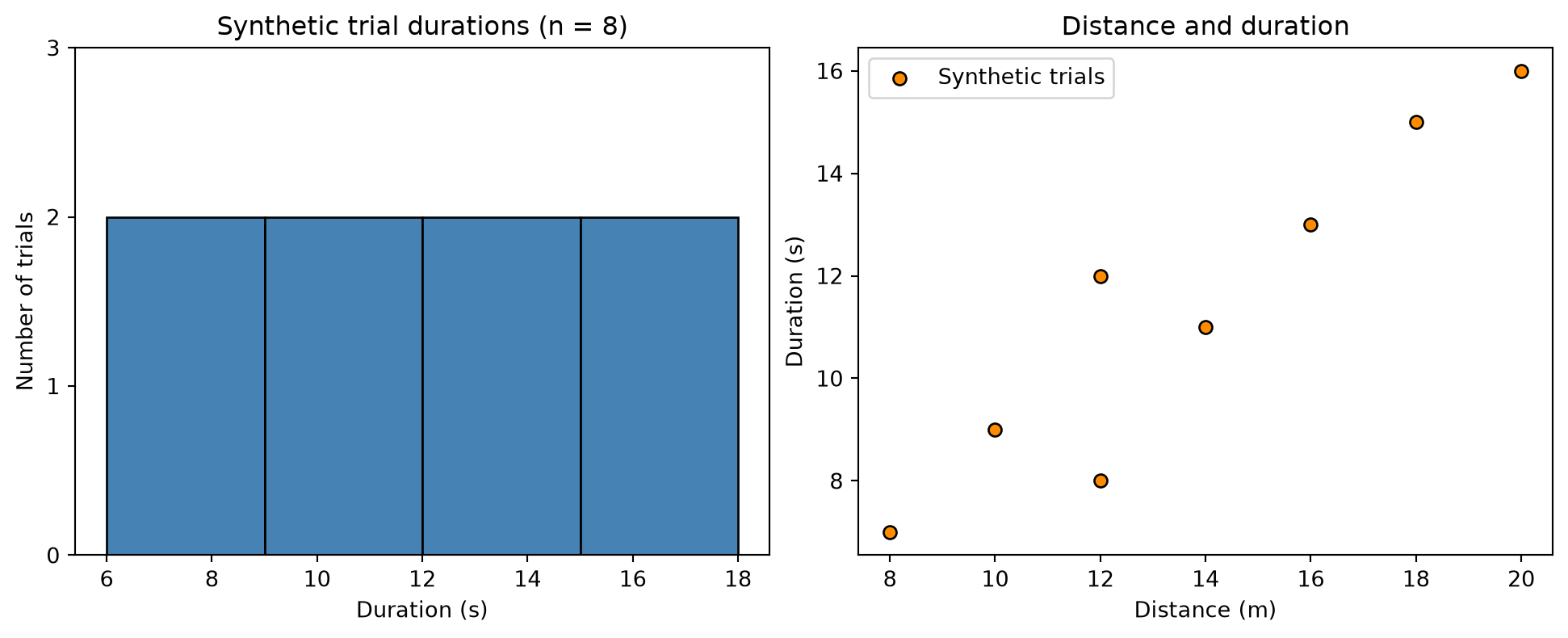
# Step 1: Import table and plotting libraries.import pandas as pdimport matplotlib.pyplot as plt# Step 2: Store eight synthetic trials; each row keeps paired measurements.# Distance is measured in meters and duration in seconds.trials = pd.DataFrame( {"distance_meters": [8.0, 10.0, 12.0, 12.0, 14.0, 16.0, 18.0, 20.0],"duration_seconds": [7.0, 9.0, 8.0, 12.0, 11.0, 13.0, 15.0, 16.0], })# Step 3: Create two plotting regions in one overall figure.# The returned axes array contains the left and right plotting regions.figure, axes = plt.subplots(1, 2, figsize=(10, 4), layout="constrained")# Select the first region for the duration histogram.duration_axis = axes[0]# Select the second region for paired distance-duration points.association_axis = axes[1]# Step 4: Count durations in four explicitly chosen equal-width bins.# Edges are seconds; all eight observations fall within the displayed interval.duration_bin_edges_seconds = [6.0, 9.0, 12.0, 15.0, 18.0]duration_axis.hist( trials["duration_seconds"], bins=duration_bin_edges_seconds, edgecolor="black", color="steelblue",)duration_axis.set_title("Synthetic trial durations (n = 8)")duration_axis.set_xlabel("Duration (s)")duration_axis.set_ylabel("Number of trials")duration_axis.set_ylim(bottom=0)duration_axis.set_yticks([0, 1, 2, 3])# Step 5: Plot each trial as one paired point without implying a time order.association_axis.scatter( trials["distance_meters"], trials["duration_seconds"], color="darkorange", edgecolor="black", label="Synthetic trials",)association_axis.set_title("Distance and duration")association_axis.set_xlabel("Distance (m)")association_axis.set_ylabel("Duration (s)")association_axis.legend()plt.show()
Figure 4.1: Synthetic trial descriptions. The histogram counts eight durations; the scatter plot preserves the distance-duration pairing of each trial. These invented values do not support population or causal claims.
The histogram shows counts in chosen duration intervals. Changing bin edges may change the visual impression, especially with eight observations. It cannot establish a smooth population distribution. Matplotlib documents bin boundaries and counts in Axes.hist.
The scatter plot suggests that the larger invented distances generally accompany longer durations. The two trials at 12 meters also show that equal distance does not force equal duration. A point represents a trial, not a participant. If trials from the same person are repeated, the plot alone does not remove that dependence. Axes.scatter documents point styling and coordinates.
4.8.2 A line plot needs an ordered horizontal coordinate
Connecting unrelated trial IDs by a line can imply continuity that the data do not support. A time coordinate provides a meaningful order when samples belong to the same signal. Do not connect the end of one participant’s recording to the start of another participant’s recording.
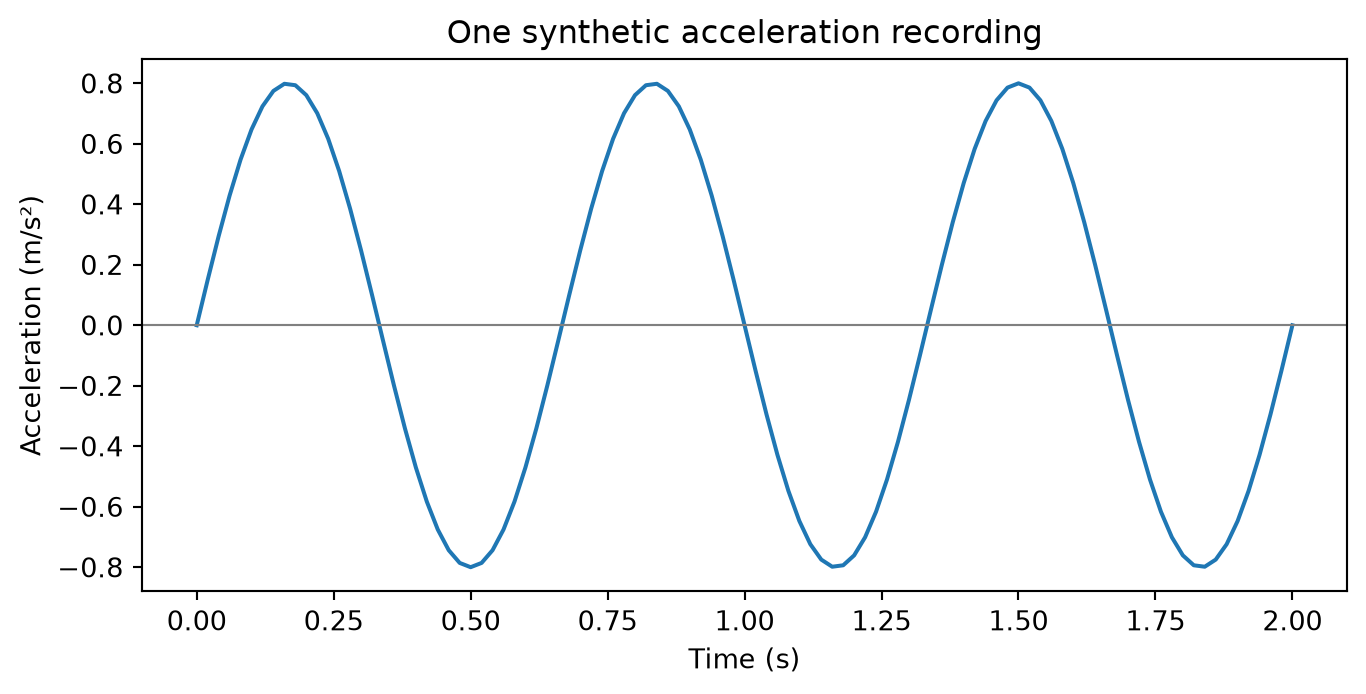
# Step 1: Import tools for numerical coordinates and plotting.import numpy as npimport matplotlib.pyplot as plt# Step 2: Define a synthetic signal with documented physical units.# Sample times span two seconds, including both endpoints.time_seconds = np.linspace(0.0, 2.0, 101)# Frequency is cycles per second; this is a chosen illustrative value.frequency_hertz =1.5# Amplitude determines the acceleration range in m/s^2.acceleration_amplitude =0.8# The sine argument is dimensionless: 2*pi * cycles/second * seconds.acceleration_meters_per_second_squared = acceleration_amplitude * np.sin(2.0* np.pi * frequency_hertz * time_seconds)# Step 3: Draw one line through samples in increasing time order.# One figure and one axis are sufficient for this recording.figure, axis = plt.subplots(figsize=(7, 3.5), layout="constrained")axis.plot( time_seconds, acceleration_meters_per_second_squared, label="Synthetic acceleration",)axis.set_title("One synthetic acceleration recording")axis.set_xlabel("Time (s)")axis.set_ylabel("Acceleration (m/s²)")axis.axhline(0.0, color="gray", linewidth=0.8)# The title identifies this single signal; no group legend is needed.plt.show()
Figure 4.2: An invented oscillating acceleration signal sampled at 101 equally spaced times. The line connects time-ordered samples of one synthetic recording.
This is a mathematically generated sine wave, not measured gait acceleration. Its regular pattern follows from the construction. It does not demonstrate that real gait has exactly this frequency or waveform. Axes.plot describes the line-plot interface.
4.9 Honest visual communication and common failures
Use a title that identifies what was plotted, axes that state quantities and units, and a caption that explains the observation unit and any exclusions. A legend is useful when colors or symbols encode groups. Choose distinguishable markers as well as colors when several groups matter. Keep font sizes readable in both HTML and PDF.
For bars representing magnitude, starting at zero helps readers compare lengths. A nonzero lower limit can be appropriate for a detailed line or scatter plot, but make the axis clear and avoid using it to exaggerate a small change. State logarithmic scales explicitly. If comparing panels, consider common scales; different ranges can make identical effects look different.
Do not label an error bar until you know what it represents: spread of observations, standard error of an estimate, and a confidence interval answer different questions. This chapter uses no uncertainty bars because the tiny invented examples do not estimate a real population quantity. Chapter 8 explains uncertainty before those displays are introduced.
Failure
Consequence
Better check
Missing duration replaced by zero
A missing measurement becomes a false measurement
Count missingness and define a policy
Metadata attached by row order
Values can belong to the wrong participant
Join by keys and validate cardinality
Targets sorted independently
Inputs and targets describe different trials
Select from one common table
Trial IDs used as numerical features
Arbitrary coding can look predictive
Define feature meaning and availability
Many trials treated as many people
Dependence is concealed
Count and preserve participant identity
A smooth line drawn through unrelated trials
False continuity is implied
Use separate points or meaningful order
Exploration also has a boundary in predictive work. Inspecting training data helps develop a model. Repeatedly consulting a final test set while changing cleaning rules, features, or model settings uses test information for development. Preserve that evaluation boundary even when the operation is “only a plot.” The workflow chapters explain suitable validation sets and grouped splits.
4.10 Exercises and worked answers
4.10.1 1. Choose the key
A participant completes three trials. Each trial is divided into five windows. Is participant_id a unique window key?
Answer: No. It identifies a person, not a trial or window. A valid window key could be a unique window_id or a documented combination of participant, session, trial, and window index. Retain the participant key separately for grouping and evaluation.
4.10.2 2. Check a join before accepting it
There are six trial rows and participant metadata contains two records for P01. What should a many-to-one trial-to-participant merge do?
Answer: It should fail validation because the right-side participant key is not unique. Investigate whether the duplicate is an error or whether metadata are actually session-specific. In the latter case, the correct join may require both participant and session keys. Removing a duplicate arbitrarily could discard a real distinction.
4.10.3 3. Missing or invalid?
Classify a blank duration, a duration of zero, and the text "ten" in a numerical duration field.
Answer: The blank is missing. Zero is numeric but invalid for this positive-duration contract. "ten" violates the numerical representation expected by the parser. Preserve the source value and record why it needs attention; these are different problems.
4.10.4 4. Select a plot
You have one hundred unordered trials with speed and a synthetic score. Should you connect the points in input-file order?
Answer: Use a scatter plot to inspect their paired relationship. File order is not necessarily a meaningful trajectory. Label both axes and identify whether repeated trials belong to the same participants. A visible relationship still requires a defensible statistical analysis before generalization.
4.10.5 5. Interpret unequal participant weighting
P01 contributes four trial speeds of 1.0 m/s and P02 contributes one trial speed of 2.0 m/s. Compute the two averaging rules.
Answer: The trial-weighted mean is \((4+2)/5=1.2\) m/s. The mean of participant means is \((1+2)/2=1.5\) m/s. State which question each answers instead of choosing the one that looks more favorable.
4.10.6 6. Interview question: are matching shapes enough?
Features have shape (100, 4) and targets have shape (100,). Does that prove the dataset is aligned?
Answer: No. It proves only that row counts match. You also need corresponding observation identities and order. Preserve a unique key and build aligned arrays from the same selected table or verified key-based join.
4.11 One-page revision summary
Define one row, its identifier, each column, units, and validity rules.
Inspect shape, types, missingness, duplicate keys, and distinct groups.
Use .loc for labels/masks and .iloc for positions; keep mutations explicit.
Distinguish missing measurements from present invalid values and true zeros.
Join by documented keys; validate uniqueness, cardinality, and unmatched rows.
Preserve a common row order for features, targets, and record IDs.
Report counts with summaries and choose trial or participant weighting deliberately.
Use histograms for numerical distributions, scatter plots for paired quantities, and lines for meaningful order.
Label quantities, units, groups, sample counts, exclusions, and synthetic examples.
Describe what the observed data show; do not turn an exploratory pattern into a causal or population claim.
The computing foundations are now in place. The mathematics chapters explain the operations and uncertainty behind later models. Chapter 11 then combines these skills with a defensible study question and data provenance.